AI Grading for Open-Ended and Essay Questions on Paper Exams
 Oscar Munoz
·
·
8 min read
Oscar Munoz
·
·
8 min read
Multiple-choice questions grade themselves: a bubble sheet scanner reads the marks and the score falls out in seconds. The real time sink in any paper exam is the open-ended part - short answers, definitions, worked problems, and mini-essays that a teacher has to read, decipher, and score one by one. This guide explains how AI grading of open-ended questions works, what ICR handwriting recognition is, and how FormRead combines both so you can scan a paper exam and get a drafted score and written feedback for every handwritten answer.

Why Grading Open-Ended Questions Is So Slow (and Inconsistent)
Grading a stack of short-answer questions by hand has three built-in problems. First, volume: reading 30 handwritten answers per exam across 100 students means 3,000 individual judgments, each requiring you to decode handwriting before you can even think about the content. Second, drift: research on human scoring has long shown that graders get stricter or more lenient as fatigue sets in, and two graders often disagree on the same borderline answer. Third, feedback: with that much volume, most students get a number and a checkmark instead of an explanation of what they missed.
This is exactly why so many exams lean heavily on multiple choice even when a short written answer would test understanding better. The bottleneck was never pedagogy - it was grading time. AI essay grading software attacks that bottleneck directly.
OCR vs ICR: Reading Print Is Easy, Reading Handwriting Is Not
Before an algorithm can grade a handwritten answer, it has to read it. That is where the distinction between OCR and ICR matters. OCR (Optical Character Recognition) reads printed, typeset text - the kind that comes out of a printer in a consistent font. ICR (Intelligent Character Recognition) is the harder problem: reading human handwriting, where every writer shapes letters differently, crosses out words, squeezes text into margins, and connects characters unpredictably.
Classic ICR engines were trained on constrained input - one character per box, block capitals only - which is why old forms made you print your name in little squares. Modern AI vision models changed this. Because they are trained on enormous amounts of real-world handwriting, they can transcribe messy, cursive, slanted student writing in context: if a word is ambiguous, the model uses the surrounding sentence and the question itself to resolve it, much like a human reader does. An ICR handwriting scanner built on this technology no longer needs boxes or block letters - it reads the answer as written on the page.
The Four Reading Technologies at a Glance
| Technology | What It Reads | Typical Use on an Exam |
|---|---|---|
| OMR | Filled bubbles and checkboxes - marks, not characters | Multiple-choice answers, true/false, Likert scales |
| OCR | Printed, typeset text in consistent fonts | Pre-printed student IDs, form labels, typed content |
| ICR | Human handwriting, including cursive and messy writing | Handwritten names, short answers, written responses |
| AI grading | The meaning of the transcribed answer, judged against a rubric | Short-answer and essay questions: score plus written feedback |
If bubble reading is new to you, our explainer covers the marks side of the pipeline in depth: What is Optical Mark Recognition (OMR) and how does it work?
How Rubric-Based AI Grading Works in FormRead
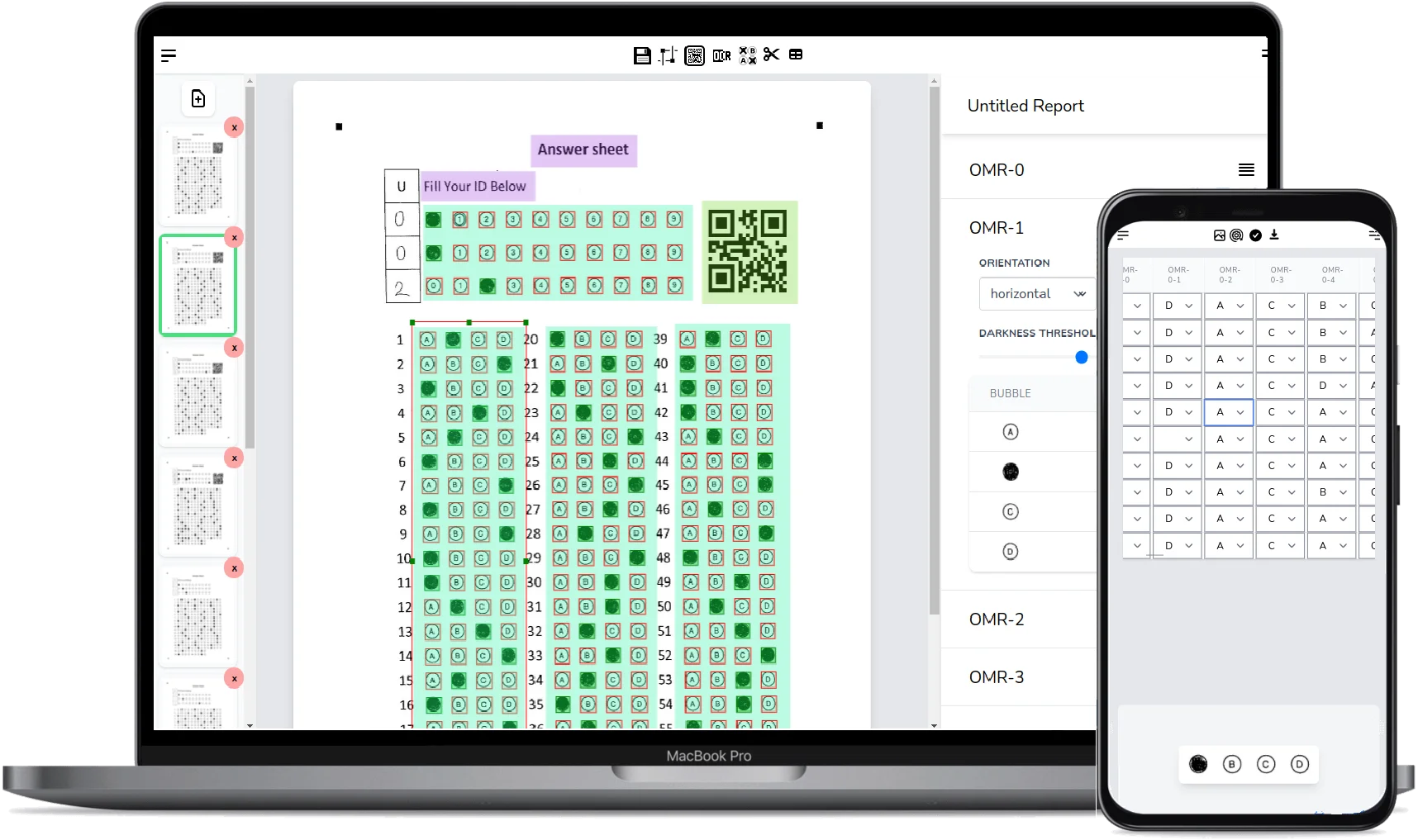
FormRead treats an open-ended question as a region on your paper form, just like a bubble grid or a barcode. When a filled exam is scanned, the pipeline crops exactly that handwritten answer region from the page image and sends it to an AI vision model together with two things you defined when building the form: the expected answer (or rubric) and the number of points the question is worth.
The model does three jobs in one pass. It transcribes the handwriting (the ICR step), it compares the meaning of what the student wrote against your rubric - not just keywords, so a correct answer phrased differently still earns credit - and it drafts a score plus a short written explanation of why that score was given. The result lands in your review screen next to the cropped image of the original handwriting, so you can verify both the transcription and the judgment at a glance.

Human in the Loop: AI Drafts, the Teacher Decides
AI grading in FormRead is deliberately not a black box that issues final marks. The AI drafts a score you review: every graded answer appears in the QA view with the cropped handwriting, the transcription, the suggested score, and the feedback text. You can accept it in one click or override the score and the feedback before anything is exported or shown to a student. In practice the AI does the slow reading and the first-pass judgment, and you keep the authority - which is also the arrangement most institutional assessment policies expect.
What Accuracy Should You Expect?
Be skeptical of any AI essay grading software that promises a fixed accuracy percentage - real-world results depend on handwriting legibility, scan quality, question type, and how precisely your rubric is written. A factual short answer with a clear expected answer ("name the capital of France, 1 point") is far easier to grade reliably than a nuanced two-paragraph argument. Our honest guidance: the AI transcription handles most ordinary student handwriting well, the drafted scores are strongest on questions with concrete rubrics, and the QA review step exists precisely so that the occasional misread word or debatable judgment gets caught by you, not by a student contesting their grade.
Two practical tips raise quality noticeably: write the rubric as you would explain it to a substitute teacher (state what earns full credit, what earns partial credit), and scan at reasonable resolution with even lighting so the cropped answer region is crisp.
Grading a stack of exams this week? FormRead is free to try - build your answer sheet, scan it with your phone, and let AI draft the open-ended scores for you.
Start using FormRead freeFormRead vs Gradescope vs Manual Grading
Gradescope (by Turnitin) is the best-known name in assisted grading, and it is genuinely good at what it was built for: university courses, typed or scanned submissions, and grouping similar answers so a grader can mark many at once. Its AI assistance focuses on clustering and rubric application, and its workflows assume an instructor-plus-TAs setup. It is also priced for institutions rather than individual teachers.
FormRead comes at the problem from the paper-first direction. It is a free online OMR platform where the whole exam - bubbles, student ID barcodes, and handwritten answer regions - lives on one printed sheet that you scan with a phone or any scanner. The AI transcribes and drafts a grade for each open-ended answer automatically against your rubric, you review in the QA view, and results export to Excel or CSV. If you need to grade short answer questions automatically inside your own system, the same pipeline is available over HTTP - see our server-side form processing API guide for the batch endpoint and code examples.
And compared with pure manual grading? You keep the final say either way - the difference is whether you also do the mechanical reading and first-pass scoring yourself, or start from a drafted score and feedback for every answer.
Step-by-Step: Set Up AI Grading in FormRead
-
1
Design your exam sheet
In the FormRead editor, lay out your multiple-choice bubble grids as usual, then draw an open-ended question area over each space where students will write an answer.
-
2
Define the rubric per question
For each open-ended area, enter the expected answer or grading criteria and the maximum points. Be explicit about what earns partial credit - the AI follows your rubric, so clearer criteria produce better drafts.
-
3
Print and give the exam
Print on standard paper. Students bubble the multiple-choice section and handwrite their open-ended answers inside the marked areas with a dark pen or pencil.
-
4
Scan the filled sheets
Capture each sheet with your phone camera or upload scanner images. FormRead reads the bubbles instantly and sends each cropped handwritten region to the AI, which returns a transcription, a drafted score, and written feedback.
-
5
Review in the QA view and export
Step through the drafted grades next to the original handwriting, override any score or feedback you disagree with, then export the combined multiple-choice and open-ended results to Excel or CSV.
The Bottom Line
Open-ended questions are the most valuable part of an exam and, historically, the most expensive to grade. Modern ICR handwriting recognition plus rubric-based AI grading changes the economics: the machine reads and drafts, you review and decide, and students get real written feedback instead of a bare number. If your exams are still all multiple choice purely to save grading time, that constraint is gone.
AI Grading of Open-Ended Questions: FAQ
Can AI really read messy student handwriting?
In most cases, yes. Modern AI vision models are trained on huge volumes of real handwriting and read answers in context, so they handle cursive, slant, and imperfect letters far better than classic ICR engines that required block capitals in boxes. Extremely illegible answers can still be misread, which is why FormRead shows the cropped original handwriting next to each transcription so you can verify it during review.
What is the difference between OCR and ICR?
OCR (Optical Character Recognition) reads printed, typeset text in consistent fonts. ICR (Intelligent Character Recognition) reads human handwriting, which varies from writer to writer. Grading a handwritten exam answer requires ICR first - the handwriting must be transcribed before it can be scored - and AI vision models now perform both the transcription and the rubric-based scoring in one pass.
Does the AI assign final grades automatically?
No. The AI drafts a score and written feedback for each open-ended answer, and everything lands in a QA review view alongside the cropped handwriting and the transcription. You accept or override every grade before results are exported, so the teacher always has the final say.
How do I write a good rubric for AI grading?
Write it the way you would brief a substitute teacher: state the expected answer or key points, how many points the question is worth, and what earns partial credit. Concrete, explicit rubrics produce noticeably better drafted scores than vague ones like "grade fairly".
How is FormRead different from Gradescope?
Gradescope is a strong institutional tool built around university workflows, typed or scanned submissions, and answer grouping, and it is priced for institutions. FormRead is a free-to-try, paper-first OMR platform: bubbles, barcodes, and handwritten answer regions live on one printed sheet you scan with a phone, and the AI transcribes and drafts a grade for each open-ended answer against your rubric automatically.
Can I grade open-ended answers through an API?
Yes. The same pipeline that powers the web app is exposed as a REST API: POST a scanned exam image (or a batch of them) and receive the OMR results plus the AI transcription, drafted score, and feedback for each open-ended region as JSON, ready to pipe into your own gradebook or LMS.