
How to Extract Data From Paper Forms Automatically
 Oscar Munoz
·
·
8 min read
Oscar Munoz
·
·
8 min read
Every filled-in paper form is a small database record waiting to be typed. Attendance sheets, patient intake forms, inspection checklists, feedback cards - someone in your organization is probably re-typing one into a spreadsheet right now. This guide shows how to extract data from paper forms automatically: which technology reads each kind of answer, the real use cases beyond exam grading, and how to convert paper forms to Excel with nothing more than a phone or an office scanner.
The Hidden Cost of Manual Data Entry
Manual data entry looks cheap because it hides inside existing jobs. A teacher tallies attendance after class, a receptionist re-types intake forms between patients, a site supervisor copies checklist results into a report on Friday afternoon. Nobody sees a line item for it, but the cost is real:
- It is slow and does not scale: doubling the number of forms doubles the typing time, and a big survey or event can bury a team for days.
- It is error-prone: typos, skipped rows and misread handwriting slip into your records silently, and you rarely find out until the numbers stop adding up.
- It wastes skilled time: staff hired to teach, treat patients or run inspections end up doing clerical work a computer finishes in seconds.
- It delays decisions: results that could be available the same afternoon arrive days or weeks later, after the moment to act has passed.
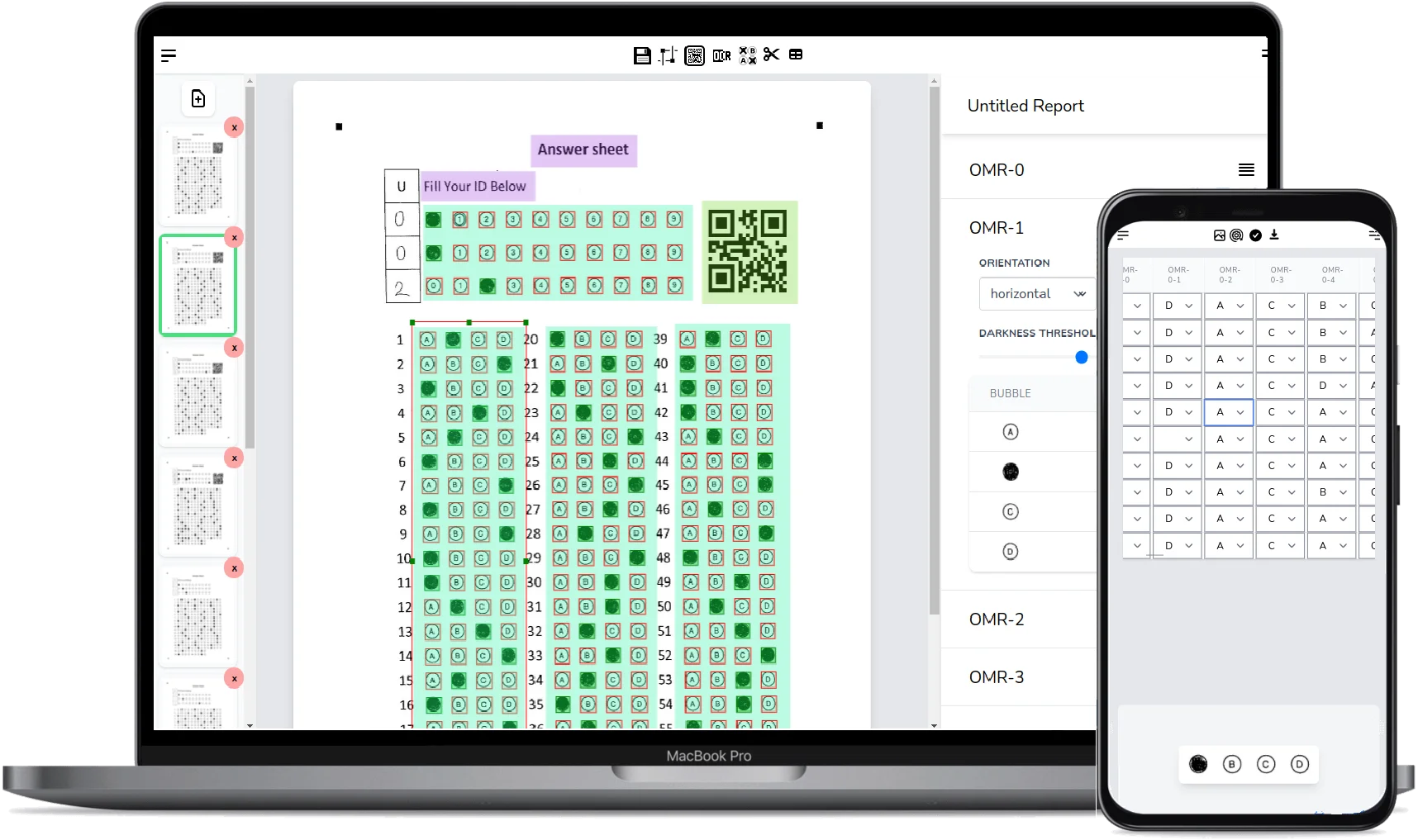
Paper form data extraction software removes that bottleneck. You define the form layout once, scan the filled pages in batch, and the software reads every mark, text field and barcode into structured rows you can export or query.
The Four Types of Data on a Paper Form
Most paper forms mix four kinds of information, and each one is read by a different recognition technology. Bubbles and checkboxes are handled by optical mark recognition - if you want the full technical story of how mark detection works, read our guide on what optical mark recognition is and how it works. The other three data types need their own engines, and a good form scanner combines all four on the same page:
| Data on the form | Technology that reads it | How it works |
|---|---|---|
| Bubbles and checkboxes | OMR (Optical Mark Recognition) | Detects which circles or boxes are filled by analyzing the pixel density inside each mark area. |
| Printed text | OCR (Optical Character Recognition) | Recognizes machine-printed characters such as names, IDs and dates in fixed text fields. |
| Handwriting | ICR with AI transcription | AI vision models transcribe handwritten answers, from a scribbled name to a full open-ended response. |
| Barcodes and QR codes | BCR (Barcode Recognition) | Decodes 1D barcodes and QR codes - ideal for linking each sheet to a student, patient or asset ID. |
FormRead runs all four engines on every scanned page, so a single intake form can yield checkbox answers, a printed patient ID, a handwritten comment and a QR code in one pass.
Real-World Use Cases Beyond Exam Grading
Bubble-sheet exam grading is the classic example, but any workflow where people fill in a fixed printed layout can be digitized the same way.
Attendance sheets for schools and trainings
An attendance sheet scanner turns the daily sign-in ritual into data. Print a roster with a checkbox or bubble per student and per session, collect the sheets, and scan the whole week in one batch. You get per-student attendance rates in a spreadsheet instead of a drawer full of paper - especially useful for training providers who must report attendance to certifiers or funders.
Patient intake and consent forms
Clinics still hand patients a clipboard, and that is fine - paper is fast at the front desk. A patient intake form scanner reads the checked symptoms, printed policy numbers and handwritten fields into structured records, so staff verify instead of re-typing. Because health information is sensitive, FormRead is built for privacy-conscious handling: your scans and results stay in your account and you can delete them at any time.

Safety and inspection checklists
Vehicle walkarounds, equipment audits and site safety rounds usually live on clipboards because tablets break, run out of battery or simply do not fit the job. Scanning the completed checklists afterward gives you a searchable log of every pass, fail and inspector comment - with dates and asset barcodes attached - without changing how crews work in the field.
Event registration and feedback forms
Paper feedback cards get far better response rates at live events than a follow-up email ever will. Hand out cards with rating bubbles and a comment line, collect them at the door, and have tallied satisfaction scores plus AI-transcribed comments before the venue is even cleaned up.
Field research and data collection
Researchers running household surveys or ecological observations often work where connectivity is unreliable and devices are a liability. Paper instruments are cheap, need no charging and never lose a session. Scanning them in batch afterward gets responses into analysis-ready CSV files without weeks of double entry.
You can test all of this right now with your own form - no credit card, no scanner hardware.
Start using FormRead freeThe Workflow: From Paper Stack to Spreadsheet
Digitizing paper forms with FormRead follows the same four steps regardless of the use case:
-
1
Recreate the form template once
Open the drag-and-drop editor and mark where each field sits on your form - bubble groups, checkboxes, text fields, handwriting areas and barcodes. You can rebuild an existing form or design a new one from scratch. This template is reused for every future batch.
-
2
Scan the filled forms in batch
Photograph pages with a phone or feed a stack through any office scanner, then upload the images together. Corner anchor marks let the software align each page automatically, even from slightly skewed photos.
-
3
Review in the QA screen
Spot-check the extracted values against the original images, focusing on ambiguous marks and handwriting transcriptions. This is where automation plus a human glance beats both pure manual entry and blind automation.
-
4
Export or integrate
Download the results as Excel or CSV, or pull them into your own system through the REST API so the data lands directly in your database, LMS or EHR-adjacent tooling.
Web App or API: Which Should You Use?
The web app is the right choice when a person is in the loop: a teacher scanning a batch of sheets, an office manager digitizing this week of intake forms. Everything - template editor, batch upload, QA review, export - happens in the browser with nothing to install.
The API is the right choice when paper form data extraction is part of a product or an automated pipeline. There are two integration styles: you can embed the form editor and scanner in your own app via iframe so your users design and scan forms without leaving your product, or you can go fully server-side and POST scanned images to the processing API and receive structured JSON back - no browser involved, with batch endpoints for high volume.
How It Compares to the Alternatives
Hiring data-entry staff
Outsourced or in-house data entry works, but the cost grows linearly with volume forever, turnaround is measured in days, and quality control means paying twice for double entry. Software processes a batch in minutes at a flat cost, and the QA review step gives you the accuracy check without the second typist.
Generic document OCR tools
Tools like Docparser are genuinely good at what they target: pulling text and table data out of typed documents such as invoices, purchase orders and contracts. But they are built around machine-printed text. Filled bubbles, ticked checkboxes and messy handwriting on a fixed form layout are a different problem - one that needs OMR, template alignment and AI handwriting transcription. If your documents are typed, a document parser is a fine choice; if humans filled them in with a pen, you want a form scanner built for marks and handwriting.
Pro Tip
Design for the machine from day one: give every answer a dedicated bubble, checkbox or boxed field instead of free-floating blank lines, and add a barcode or QR code that identifies the respondent. Structured layouts scan dramatically better than open pages, and the ID code removes the single most error-prone field - the handwritten name.
Conclusion
Paper is not going away - it is still the fastest, cheapest and most reliable way to collect answers from a room full of people. What can go away is the typing. With OMR for marks, OCR for print, AI for handwriting and barcode reading for IDs, you can digitize paper forms the same day they are filled in and spend your time on the results instead of the transcription.
Frequently Asked Questions About Paper Form Data Extraction
Can FormRead read handwriting on paper forms?
Yes. FormRead uses AI-powered ICR to transcribe handwritten fields, from names and dates to full open-ended answers. Handwriting recognition is less predictable than bubble reading, so we recommend checking transcriptions in the QA review step before exporting.
Do I need a special scanner or proprietary forms to extract data from paper forms?
No. FormRead works with photos taken on any smartphone or images from a regular office scanner, and it reads forms you design yourself in the free template editor, printed on standard paper.
How accurate is automated paper form data extraction?
Mark recognition for bubbles and checkboxes is highly accurate when forms are printed clearly and scanned with decent lighting. OCR and handwriting accuracy depend on print and writing quality, which is why FormRead includes a QA review screen so you can verify uncertain fields against the original image before export.
Can I convert paper forms to Excel or CSV?
Yes. After processing a batch you can download all results as an Excel or CSV file, or pull them programmatically through the REST API to feed your own database or application.
Is the data from my scanned forms private?
Your forms and results belong to you. FormRead is designed for privacy-conscious handling of sensitive documents such as patient intake forms, and you can delete your uploaded images and extracted data from your account at any time.
Can I process many forms at once?
Yes. Batch mode lets you upload a whole stack of scanned pages against one template and process them together in the web app, and the server-side API supports batch requests for automated high-volume pipelines.