
How to Grade Multiple Choice Tests Fast: 5 Methods Ranked
 Oscar Munoz
·
·
8 min read
Oscar Munoz
·
·
8 min read
If you teach, you already know the routine: the test takes students 45 minutes, and then it takes you an entire evening. Learning how to grade multiple choice tests fast is one of the highest-leverage skills a teacher can pick up, because the grading itself teaches nothing - it is pure clerical work. In this guide we rank five grading methods from slowest to fastest, put real numbers on each one, and finish with a step-by-step walkthrough for grading a stack of 30 bubble sheets in under 10 minutes using nothing but your phone and free online OMR software.

The Real Time Cost of Hand-Grading
Start with simple arithmetic. A typical class test is 30 students answering 50 questions - that is 1,500 individual answers you have to check by eye. Even at a brisk two seconds per answer, comparing each response against your key takes about 50 minutes of uninterrupted focus. Add totaling the scores, double-checking the borderline papers, and typing 30 results into your gradebook, and one class set realistically costs 60 to 90 minutes.
Now multiply that by your actual teaching load. A teacher with five sections giving one test every two weeks is spending 10 to 15 hours a month on grading that a machine could do in minutes - and unlike a machine, a tired human makes mistakes. Misread answers and addition errors are exactly the kind of thing students catch and dispute later.
5 Ways to Grade Multiple Choice Tests Faster
Here are the five methods teachers actually use, ordered from slowest to fastest. Each one is a legitimate improvement over checking answers line by line - the question is how much time, money, and accuracy you trade away.
1. Answer-Key Overlay (the Punched Key)
The classic low-tech trick: take a blank answer sheet, punch a hole through each correct bubble (or mark it on a transparency), and lay it over each student's paper. Every visible pencil mark through a hole is a correct answer; you just count them. It roughly halves your grading time because you stop reading question numbers and letters and start pattern-matching. The downsides: you still handle every paper twice, you still count and record scores by hand, and the overlay only works if every student used the same printed layout.
2. Self-Grading and Peer Swap
Have students swap papers, read out the answers, and let them mark each other's work. This moves grading off your desk entirely and can even be a review activity - going over the answers aloud is genuine reteaching. But it consumes 15 to 20 minutes of class time, it is not appropriate for high-stakes grades, and accuracy depends on 30 teenagers paying attention. Most schools also have privacy policies that limit peer grading of recorded scores, so check yours before relying on it.
3. Google Forms and Going Fully Digital
If every student has a device, a Google Forms quiz in locked mode grades itself the instant a student hits submit - grading time is effectively zero. For homework and low-stakes checks this is hard to beat, and it is free. The catch is the word if. Digital quizzes need a device per student, a working network, and an environment where screens are allowed. Many schools still require paper for exams to prevent tab-switching and copying, standardized-style practice is deliberately done on paper bubble sheets, and plenty of classrooms simply do not have one-to-one devices. When the test must be on paper, going digital is not an option - which is why the next two methods exist.
4. Phone Grading Apps Like ZipGrade
Mobile grading apps such as ZipGrade turn your phone camera into a bubble sheet scanner: print their answer sheet, hold your phone over each paper, and the score appears in about a second per sheet. This is a huge leap - a class set takes minutes, not an evening. The trade-offs are that you typically must use the app's own preprinted answer sheet formats, free tiers usually cap how many papers you can scan per month before you need a paid subscription, and your grading workflow lives inside one phone app rather than in files you control.
5. Online OMR Software (FormRead)
The fastest and most flexible option is browser-based OMR software - the same optical mark recognition technology behind Scantron machines, running as a free web app instead of a $5,000 scanner. If you are new to the term, our plain-English guide explains what optical mark recognition is and how it works in plain English.
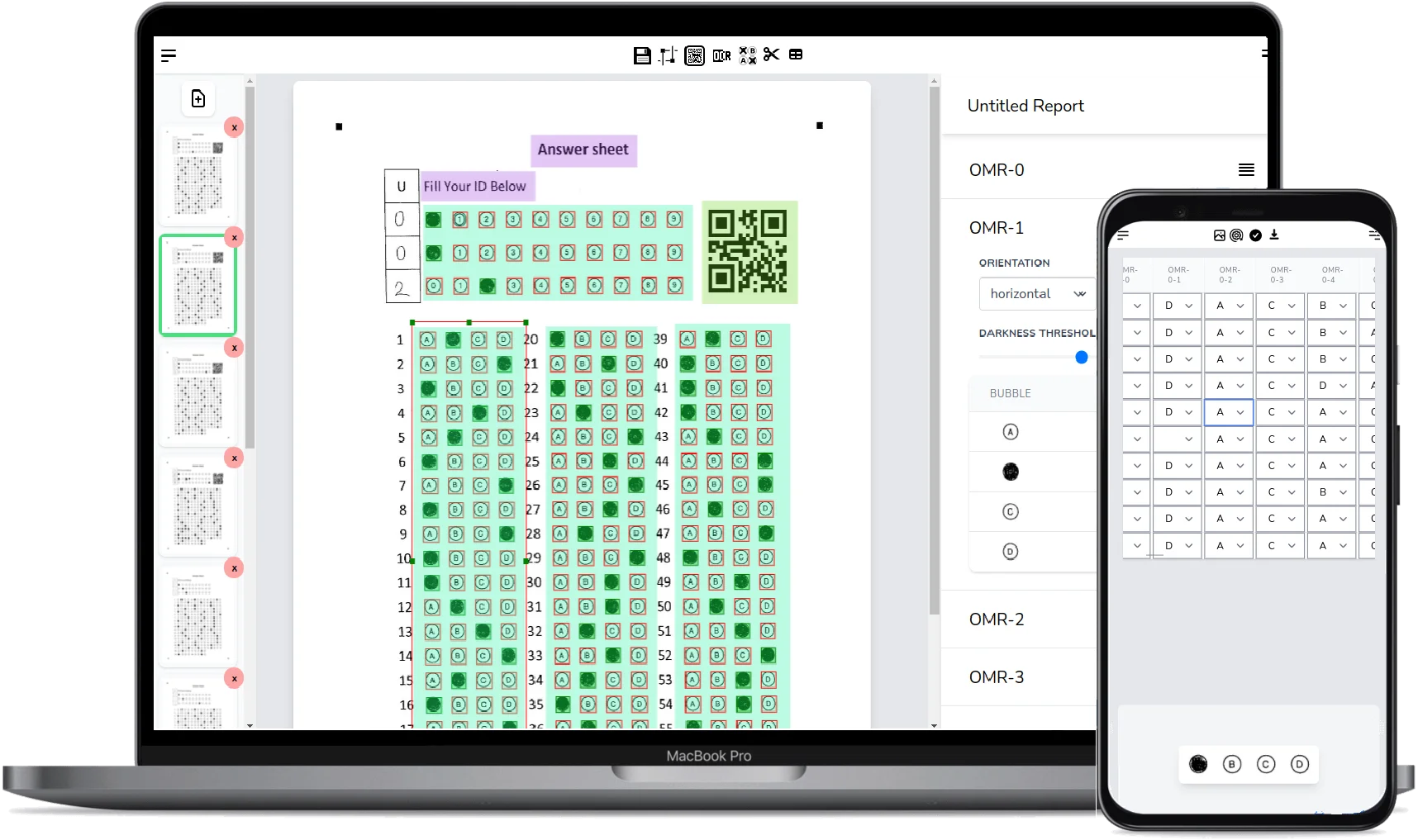
With FormRead you design any answer sheet you like, or grab a ready-made one from our free OMR answer sheet templates. Print it on plain paper, then grade the whole stack by scanning with your phone camera or by uploading images from any office scanner - it works with both. Every sheet is auto-graded against your answer key, and the full score table exports to Excel or CSV in one click. There is a free tier, no proprietary forms, no per-scan hardware, and a REST API if your school wants to plug grading into its own systems.
Comparison: Time, Cost, and Equipment for 30 Tests
Here is how the five methods stack up on a typical class set of 30 tests with 50 questions each, with plain hand-grading included as the baseline.
| Method | Time for 30 tests | Cost | Equipment |
|---|---|---|---|
| Hand-grading (baseline) | 60 - 90 minutes | Free | Red pen and patience |
| Answer-key overlay | 30 - 45 minutes | Free (DIY) | Punched sheet or transparency |
| Peer swap self-grading | 15 - 20 minutes of class time | Free | None (uses lesson time) |
| Google Forms (digital quiz) | Instant (auto-graded) | Free | A device per student + internet |
| Phone app (e.g. ZipGrade) | About 5 - 10 minutes | Free tier with scan limits, then subscription | Smartphone + the app's answer sheets |
| Online OMR (FormRead) | Under 10 minutes, batch upload supported | Free tier | Phone camera or any scanner, plain paper |
Want to see how fast your next test could be graded? FormRead runs in your browser - no install, no special forms, no scanner required.
Start using FormRead freeHow to Grade 30 Tests in Under 10 Minutes with FormRead
Here is the exact workflow, from blank sheet to an Excel gradebook. The first two steps are one-time setup you reuse for every future test.
-
1
Create your answer sheet
Open the FormRead editor and drag a multiple choice grid onto the page - 50 questions, A to D, done in a couple of minutes. Or skip design entirely and download a ready-made template. You can even build the sheet yourself in Word following our Microsoft Word OMR answer sheet tutorial.
-
2
Set the answer key
Mark the correct bubble for each question once. FormRead will score every scanned sheet against this key automatically.
-
3
Print on plain paper
Any standard printer, any regular copy paper. No proprietary forms, no special ink.
-
4
Give the test
Students fill in bubbles with a dark pencil or pen, exactly as they would on any bubble sheet.
-
5
Scan the stack
Point your phone camera at each sheet in the FormRead web app, or feed the whole pile through your school copier's document feeder and upload the images in one batch. At a few seconds per sheet, 30 papers take well under 10 minutes either way.
-
6
Review and export
Check the results table, review any sheet the software flags as ambiguous, then export everything to Excel or CSV and paste it straight into your gradebook.
Tips for Reliable Scanning
OMR accuracy is mostly about contrast. A few habits make every scan read cleanly on the first try:
- Scan in good, even lighting - avoid shadows falling across the page.
- Have students fill bubbles completely with a dark pencil or pen; faint dots and half-filled circles are the main cause of misreads.
- Print on plain white paper and keep the sheet flat - folds and crumples distort the bubble grid.
- Erase changed answers fully, or have students cross out and re-mark clearly.
Make your answer sheet in a minute
The free FormRead answer sheet generator lets you design bubble sheets like a Word document, print a different name or QR code on every sheet from your class list, and turn the design into a ready reading template.
Which Method Should You Use?
Every method on this list beats grading by eye. Use peer swaps for low-stakes review, use Google Forms when every student has a device and screens are allowed, and keep a punched key around for the odd one-off quiz. But for the common case - a real test, on paper, graded accurately, with results in a spreadsheet - online OMR is the method that removes grading from your evenings entirely. It grades multiple choice tests online from a photo or a scan, costs nothing to try, and leaves you with data you own.
Frequently Asked Questions About Fast Test Grading
What is the fastest way to grade multiple choice tests?
Automated scanning is the fastest way to grade paper tests. Online OMR software like FormRead reads each bubble sheet from a phone photo or scanner image in seconds, scores it against your answer key, and exports all results to Excel - a class set of 30 tests takes under 10 minutes instead of an evening.
Can I grade bubble sheets with just my phone?
Yes. FormRead runs in your phone's web browser, so you point the camera at each answer sheet and it is graded on the spot. No app install is required, and you can also upload images from a regular office scanner if you prefer to scan the whole stack at once.
Is FormRead really free for teachers?
FormRead has a free tier that lets you design answer sheets, scan them, and export results without buying any hardware. Paid plans add higher usage limits and API access for schools that want to process large volumes or integrate grading into their own systems.
Do I need Scantron forms or special paper to auto grade tests?
No. Unlike Scantron machines and most phone grading apps, FormRead works with answer sheets you design yourself and print on plain paper with any printer. You can also start from a free downloadable template or build your own sheet in Microsoft Word.
Can I export the grades to Excel or my gradebook?
Yes. After scanning, FormRead shows every student's score in a results table that you can export to Excel or CSV in one click, ready to paste into any digital gradebook. Developers can also pull the same results as JSON through the REST API.
What happens if a student marks two bubbles or erases an answer?
FormRead analyzes the darkness of every bubble, so a fully erased answer is read as blank and the newly marked bubble is counted. Ambiguous cases, like two bubbles filled for one question, are flagged in the results so you can review those specific answers instead of re-checking the whole sheet.