How to Scan Answer Sheets With Your Phone (No Scanner, No App Store)
 Oscar Munoz
·
·
7 min read
Oscar Munoz
·
·
7 min read
You do not need a Scantron machine, a desk scanner, or even a native app to grade bubble sheets. If you can take a photo with your phone, you can scan answer sheets with it. Modern optical mark recognition (OMR) runs entirely in software, so a regular phone camera plus a web app is a complete answer sheet scanner.
In this guide we explain how phone-based OMR actually works, why a browser-based tool has real advantages over a bubble sheet grader app from the app store, and walk through the exact steps to photograph a stack of answer sheets and export the results to Excel.
How Phone-Based OMR Scanning Works
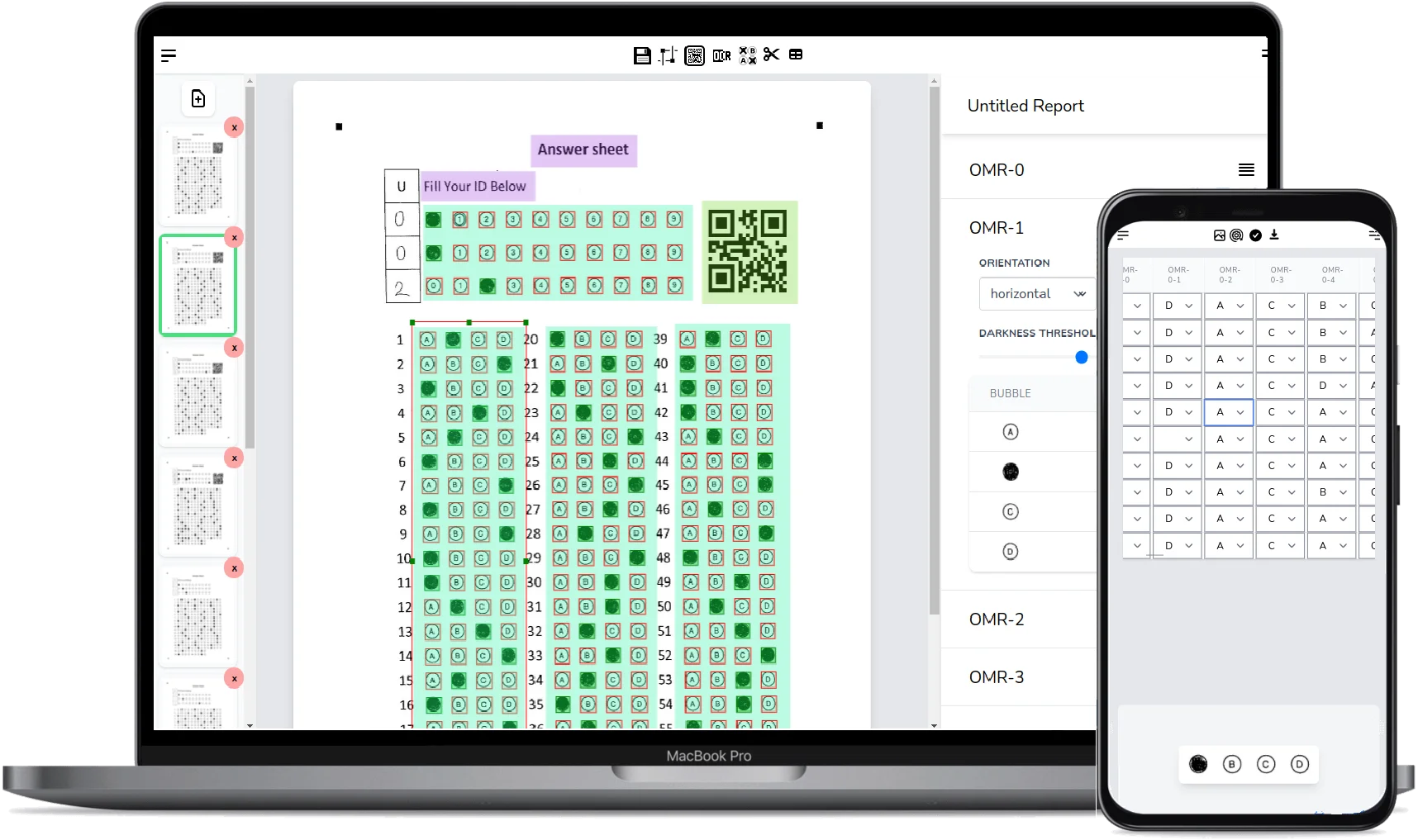
A phone photo is a much messier input than a flatbed scan: the page is slightly rotated, tilted toward the camera, and unevenly lit. A phone OMR scanner has to correct all of that before it can read a single bubble. Here is the pipeline, step by step:
-
1
Photo capture
You photograph the filled sheet with the camera built into the web app - no upload step, no separate scanner app.
-
2
Corner anchor detection
The software locates the four anchor markers printed in the corners of the sheet. These anchors tell it exactly where the page is inside the photo, even if the sheet is rotated or photographed at an angle.
-
3
Perspective correction
Using the four anchors, the image is warped back into a perfect flat rectangle - the same geometry as the original template. This step is what makes handheld phone photos as readable as flatbed scans.
-
4
Bubble analysis
Because the corrected image now matches the template, the software knows precisely where every bubble sits. It analyzes the pixels inside each one to decide whether it is filled or empty.
-
5
Grading and export
Detected answers are compared against your answer key, scored, and made available for review and export to Excel or CSV.
If you want the deeper theory behind mark detection - thresholds, pixel counting, hardware versus software scanners - read our full guide: What is Optical Mark Recognition (OMR)?
Why a Web App Beats a Native Bubble Sheet Grader App
When people search for an answer sheet scanner app, they usually assume it has to come from the App Store or Google Play. It does not. A web-based OMR scanner runs in the browser you already have, and that turns out to be an advantage rather than a compromise:
Nothing to install
Open the site, log in, and start scanning. There is no download, no storage used on your phone, and no waiting for app-store updates.
Works on any device
iPhone, Android, tablet, Chromebook, laptop - if it has a browser and a camera, it is a bubble sheet grader. There is no "iOS only" or "Android only" limitation.
Same account everywhere
Design your answer sheet on a desktop with a big screen, scan with your phone in the classroom, and review the results back at your desk. Everything lives in one account.
Scanner input too
The same web app accepts batch uploads from a regular office scanner or copier, so you are not locked into phone-only capture the way most native grading apps are.
What About ZipGrade and Other Native Apps?
ZipGrade deserves an honest mention: it is a popular, well-made native app for grading bubble sheets with a phone, and many teachers are happy with it. The trade-offs are that it requires a paid subscription for unlimited scanning after the free allowance, it works with its own predefined answer sheet forms, and it lives on the specific device where you installed it.
FormRead takes a different approach: a free tier, forms you design yourself (any layout, any number of questions, printed on plain paper), and a browser-based workflow that follows your account across phone, tablet, and desktop. It also adds OCR, barcode reading, AI grading for written answers, and a REST API for developers. Which tool fits you depends on whether you want a fixed native app or a flexible web platform.
Native App vs Web App vs Desk Scanner: Comparison
| Feature | Native App (e.g. ZipGrade) | Web App (FormRead) | Dedicated Desk Scanner |
|---|---|---|---|
| Installation | App-store download per device | None - runs in the browser | Hardware setup and drivers |
| Cost | Free allowance, then yearly fee | Free tier, paid plans for volume | Thousands of dollars upfront |
| Answer sheet forms | Predefined layouts from the vendor | Design your own, print on plain paper | Often proprietary forms required |
| Devices | Phone or tablet only | Any device with a browser | Stationary machine |
| Capture method | Phone camera | Phone camera or uploaded scanner images | Sheet feeder |
| Desktop review | Limited or via separate website | Same account, same browser | Vendor software on one PC |
| Beyond bubbles | Mostly multiple choice only | OCR, barcodes, AI-graded written answers, REST API | Depends on vendor software |
Ready to try it? FormRead is free to start - design a sheet, print it, and scan it with your phone in the next ten minutes.
Start using FormRead freeStep by Step: Grade Bubble Sheets With Your Phone
-
1
Design or download an answer sheet
Build a custom sheet in the drag-and-drop editor, grab one of our free OMR answer sheet templates, or follow our tutorial to create an OMR sheet in Microsoft Word. Make sure the corner anchor markers are part of the design - they are what makes phone scanning possible.
-
2
Print on plain paper
Any ordinary printer and standard white paper will do - no special card stock, no pre-printed proprietary forms. Print one copy per respondent and hand them out with a #2 pencil or dark pen.
-
3
Photograph each filled sheet
Open your form in FormRead on your phone and use the in-app camera to capture each sheet. The anchors are detected, the perspective is corrected, and the bubbles are read in seconds. You can also upload a batch of images from a desk scanner instead.
-
4
Review the results
Check the detected answers on screen. Ambiguous marks are easy to spot and correct manually before they ever reach your grade book.
-
5
Export to Excel or CSV
Download the full results table - scores, per-question answers, and respondent data - ready for your grade book, spreadsheet, or reporting system.
Photo Quality Tips for Reliable Phone Scanning
The perspective correction handles rotation and tilt automatically, but a few habits make every scan first-try reliable:
Get the Photo Right
- Lay the sheet on a flat surface - a desk or table, not a wobbly lap or a curled page.
- Use even lighting and avoid harsh shadows across the page; near a window or under normal room light is fine.
- Keep all four corner anchors inside the frame - if an anchor is cut off, the page cannot be aligned.
- Ask respondents to fill bubbles completely with dark marks; faint half-filled bubbles are the main cause of misreads on any OMR system.
Make your answer sheet in a minute
The free FormRead answer sheet generator lets you design bubble sheets like a Word document, print a different name or QR code on every sheet from your class list, and turn the design into a ready reading template.
Conclusion
The phone in your pocket already contains everything a bubble sheet grader needs: a good camera and a browser. Anchor detection and perspective correction turn a casual handheld photo into scanner-quality input, and a web app means the whole workflow - designing, scanning, reviewing, exporting - works on every device you own without installing anything.
Whether you grade twenty quizzes a week or process hundreds of survey sheets, scanning answer sheets with your phone is the cheapest and fastest way to get paper data into a spreadsheet.
Frequently Asked Questions: Scanning Answer Sheets With Your Phone
Can I really scan answer sheets with just my phone camera?
Yes. FormRead uses the corner anchor markers printed on the sheet plus perspective correction to turn a handheld phone photo into a flat, template-aligned image, so a normal phone camera reads bubbles as reliably as a flatbed scan.
Do I need to install an app to grade bubble sheets with my phone?
No. FormRead runs entirely in your phone's web browser. Open the site, log in, and use the in-app camera - there is nothing to download from the App Store or Google Play, and the same account works on your desktop too.
How accurate is phone-based OMR scanning?
Very reliable when the photo is reasonable: sheet on a flat surface, even lighting, all four corner anchors inside the frame, and dark, fully filled bubbles. You can also review the detected answers on screen and correct any ambiguous marks before exporting.
Is FormRead a free alternative to ZipGrade?
FormRead has a free tier, runs in the browser, and works with answer sheets you design yourself and print on plain paper. ZipGrade is a well-regarded native app that uses its own predefined forms and charges a yearly fee for unlimited scanning - which one fits you depends on your workflow.
What kind of paper and printer do I need to print answer sheets?
Any ordinary printer and standard white paper. There are no proprietary forms or special card stock - just make sure the printed sheet includes the corner anchor markers and respondents fill the bubbles with a dark pencil or pen.
Can I also upload images from a regular scanner instead of using my phone?
Yes. The same form accepts batch uploads of scanned images, so you can photograph sheets with your phone one day and feed a stack through an office scanner the next - all results land in the same account and the same Excel export.