
Answer Sheet Checking Software for OMR and Handwritten Answers
 Oscar Munoz
·
·
6 min read
Checking answer sheets by hand is the slowest part of running an exam. Answer sheet checking software does the counting for you: you scan the filled sheets, the software compares every answer with your answer key, and you get a score for each student in a spreadsheet. Modern tools can check both kinds of answers on the same page - filled OMR bubbles and handwritten written answers.
This guide explains how answer sheet checking software works, what it can and cannot check reliably, how it compares with OMR machines and manual checking, and how to check your first batch of sheets online with FormRead for free.
What Answer Sheet Checking Software Does
Every answer sheet checking tool follows the same basic pipeline:
-
1
Capture: Each filled sheet is turned into an image, either with a phone camera or with any office scanner.
-
2
Align: The software finds the corner marks of the sheet, straightens the image and matches it to your template, so a slightly crooked photo still lines up.
-
3
Read: Bubbles are read with OMR (optical mark recognition), printed text with OCR, roll numbers and barcodes with barcode reading, and handwriting with AI.
-
4
Check: The answers are compared with your answer key and the marks are added up, using the points you set for each question.
-
5
Export: Scores and every individual answer are exported to Excel or CSV, or sent to your own system through an API.
Checking OMR Answer Sheets
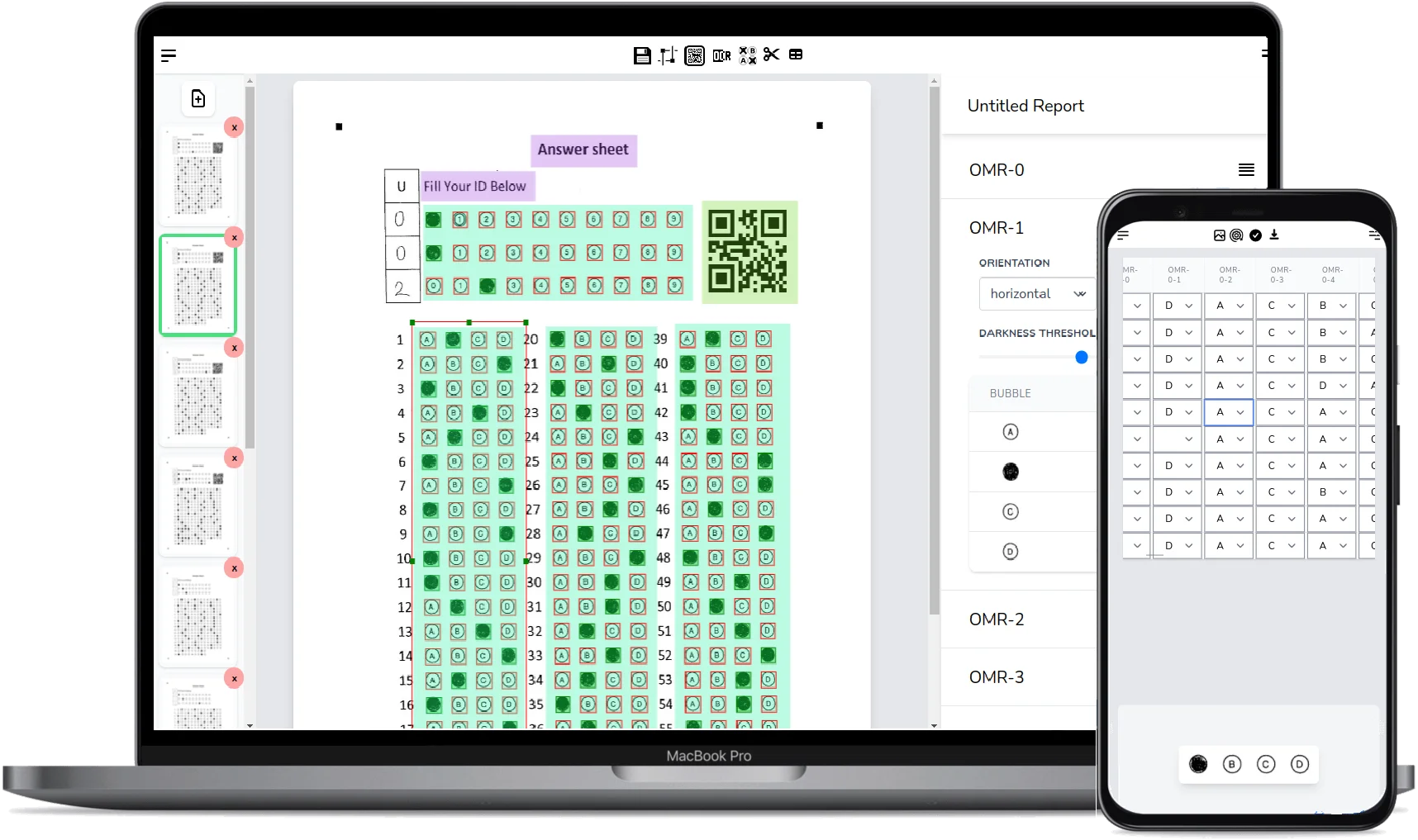
Multiple-choice OMR sheets are the easy part. Once the sheet is aligned, the software measures how dark each bubble is and decides which option was marked. With clean scans this is as reliable as a dedicated OMR machine, and it takes a second or two per sheet. If you want the technical background, read what OMR is and how OMR sheets are checked.
Good OMR sheet checking software should also handle the messy cases you see in real exams:
- Two bubbles marked in the same question, which should be flagged instead of silently counted.
- Light pencil marks, half-filled bubbles and erased answers.
- Ticks and crosses instead of filled circles.
- Photos taken at an angle or in poor classroom light.
FormRead flags uncertain answers for review instead of guessing, and its review screen shows the cropped question image next to the detected answer, so you can fix a doubtful mark in a click.
Checking Handwritten Answer Sheets Online
Written answers are harder. Before anything can be graded, the handwriting has to be read, and every student writes differently. Older handwriting recognition only worked with block capitals in separate boxes. Modern AI vision models read real student handwriting, including cursive, in context.
In FormRead, each written answer is an area on your sheet. When the sheet is scanned, that area is cropped and sent to an AI model together with the expected answer and the marks for the question. The AI transcribes the handwriting, compares the meaning with your expected answer, and drafts a score with a short reason. Our guide to AI grading of open-ended questions explains how to write the rubric.

AI scores for written answers are drafts. Every one appears in the review screen with the original handwriting and the transcription, and you accept or change it before anything is exported. Short factual answers are checked most reliably; long essays need a closer look.
Manual Checking vs OMR Machine vs Online Software
| Manual checking | OMR machine | FormRead (online) | |
|---|---|---|---|
| Time per 100 sheets | Several hours | Minutes, once the machine is set up | Minutes, from a phone or scanner |
| Equipment | None | A dedicated OMR scanner | A phone or any scanner |
| Answer sheets | Any | Special pre-printed OMR forms | Any sheet printed on plain paper |
| Handwritten answers | Yes, slowly | No | Yes, with AI-drafted scores you review |
| Results in Excel | Typed by hand | Depends on the bundled software | Yes, plus CSV and an API |
| Cost | Staff time | Thousands of dollars plus forms | Free to start |
How to Check Answer Sheets Online with FormRead
-
1
Make or upload your answer sheet: Design one in the free answer sheet generator, start from our free OMR sheet templates, or upload the sheet you already use.
-
2
Mark the areas and set the answer key: Draw the bubble grid, the roll number grid and a box for each written answer, then enter the correct options and the expected written answers with their marks.
-
3
Scan the filled sheets: Photograph them with your phone or upload a batch of scans or a PDF. Sheets are checked as they arrive.
-
4
Review the flagged answers: Open the review screen to confirm double marks, faint bubbles and the AI-drafted scores for written answers.
-
5
Export the results: Download every score and answer as Excel or CSV, or see the class statistics and question analysis in the dashboard.
Make your answer sheet in a minute
Start with a sheet that is easy to check: the free answer sheet generator lays out the bubbles, roll number grid and written-answer boxes for you.
Who Uses Answer Sheet Checking Software
- Schools and teachers: weekly tests, unit tests and term exams graded the same day.
- Coaching institutes: mock tests in the same OMR format as the real entrance exam, with rank lists exported to Excel.
- Colleges and universities: large multiple-choice papers plus short written answers checked in one pass.
- Recruitment and training: written aptitude tests and certification exams for many candidates at once.
Ask students to write inside the answer boxes with a dark pen and to fill bubbles completely. Clear boxes and dark marks matter more for accuracy than the camera you use.
Set up an answer key and check a few sheets with your phone in about ten minutes. No OMR machine and no special paper needed.
Start using FormRead freeFrequently Asked Questions
What is answer sheet checking software?
It is software that reads scanned or photographed answer sheets, compares each answer with your answer key, and calculates the score. FormRead checks multiple-choice OMR bubbles automatically and uses AI to draft scores for handwritten written answers, then exports everything to Excel or CSV.
Can software check handwritten answer sheets?
Yes. FormRead crops each written answer, reads the handwriting with an AI vision model, compares it with the expected answer you entered, and drafts a score with a short explanation. You review and confirm every drafted score before results are exported, so the teacher keeps the final decision.
Do I need an OMR machine to check OMR sheets?
No. A phone camera or any office scanner is enough. The software straightens each image using the corner marks and reads the bubbles, so the sheets can be printed on ordinary paper instead of special pre-printed OMR forms.
How accurate is online OMR sheet checking?
On clear scans with dark, fully filled bubbles, software OMR is as reliable as a dedicated OMR machine. Faint marks, double marks and erased answers are flagged for review instead of being guessed, and you can fix them in the review screen.
Is there free answer sheet checking software?
FormRead is free to start: you can create an answer sheet, set the answer key and check sheets with your phone without a credit card. AI checking of handwritten answers uses AI credits, and plans include a yearly allowance of credits.
Can I export the results to Excel?
Yes. Every score and every individual answer can be downloaded as Excel or CSV, and developers can get the same results as JSON through the FormRead REST API.