
OMR Font Free Download: Bubble, Square and Rectangle Fonts for Word
 Oscar Munoz
·
·
4 min read
An OMR font turns ordinary letters into answer bubbles. Install it, type A B C D in Word, and each letter appears inside a circle or box that students can fill in and any OMR checker can scan. Below are three free OMR fonts you can download, with step-by-step instructions to install them on Windows and Mac and use them in MS Word.
Download the Free OMR Fonts
All three fonts are free TrueType (.ttf) files packed in a ZIP. Pick the shape you like; they all scan the same way.
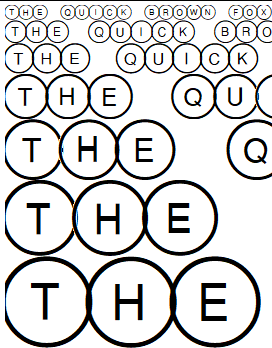
OMR Font
Bubble
OMRBubbles.ttf
Classic round bubbles, the look of most exam answer sheets.
Download ZIP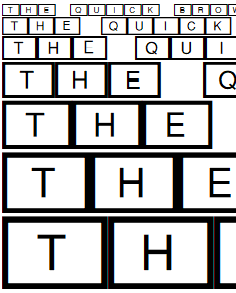
OMR Font
Rectangle
OMRRectangles.ttf
Compact rectangles that fit more options on a line.
Download ZIP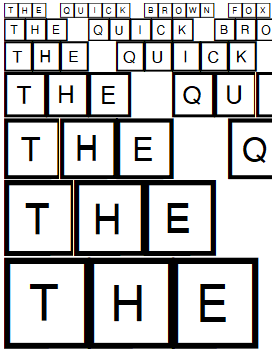
OMR Font
Square
OMRSquares.ttf
Square boxes that are quick to fill, good for surveys and checklists.
Download ZIPHow to Install an OMR Font
On Windows (Windows 10 and 11)
- Download the ZIP and extract it (right-click, then Extract All).
- Right-click the .ttf file and choose Install, or Install for all users.
- Close and reopen Word so it loads the new font.
On Mac
- Double-click the ZIP to extract it.
- Double-click the .ttf file to open it in Font Book, then click Install Font.
- Restart Word or Pages.
How to Use the OMR Font in MS Word
-
1
Make a table: Insert a table with one row per question and one column per option, plus a narrow column for the question number.
-
2
Type the options: Type A, B, C and D in the option cells.
-
3
Apply the font: Select the option cells and choose the OMR font from the font list. Each letter becomes a bubble with the letter inside.
-
4
Make it even: Give all cells the same width and height and use the same font size everywhere, so the bubbles line up in straight rows and columns.
-
5
Hide the borders and print: Remove the table borders if you want a clean sheet, then print on plain paper.
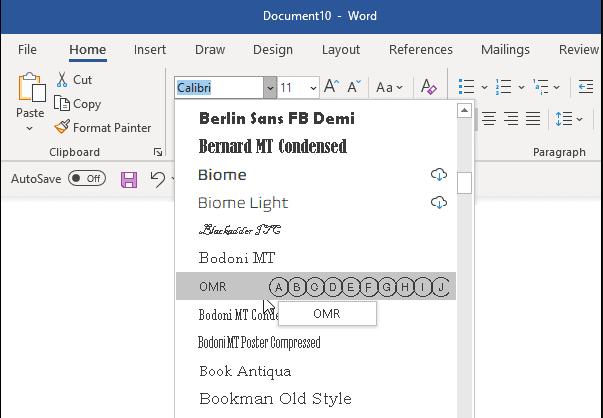
For a full walkthrough with screenshots, follow our tutorial on creating an OMR answer sheet in Microsoft Word. If you would rather not build it yourself, download a ready-made sheet from our free OMR sheet templates.
If you send the Word file to a computer without the OMR font, the bubbles turn back into plain letters. Save the sheet as PDF before sharing or printing elsewhere, or turn on Embed fonts in the file in Word options. Google Docs cannot use fonts you install yourself, so make the sheet in Word or LibreOffice.
Make your answer sheet in a minute
Skip the font and the table: the free answer sheet generator uses the same OMR bubbles and lays out questions, roll numbers and QR codes for you.
Check the Sheets You Made With Your Phone
A sheet made with an OMR font is a normal OMR sheet. Upload a blank copy to FormRead, mark the bubble areas, set the answer key, and then scan the filled sheets with your phone or any scanner. Scores come out in Excel within seconds per sheet, without an OMR machine.
Leave a clear margin around the bubble table and add a small black square in each corner of the page. Corner marks help the scanner straighten photos taken at an angle.
Set the answer key once and check every sheet with your phone. Free to start, no credit card needed.
Try the free OMR checkerFrequently Asked Questions
What is an OMR font?
An OMR font is a font in which letters are drawn inside circles or boxes. When you type A, B, C or D with it, you get answer bubbles that students can fill in and that OMR software can scan.
Are these OMR fonts free?
Yes. The Bubble, Rectangle and Square OMR fonts on this page are free to download and use for your own answer sheets, surveys and forms.
How do I install an OMR font in MS Word?
Fonts are installed in the operating system, not in Word. On Windows, extract the ZIP, right-click the .ttf file and choose Install. On Mac, double-click the .ttf file and click Install Font in Font Book. Then restart Word and pick the font from the font list.
Can I use an OMR font in Google Docs?
No. Google Docs only offers its own font library and cannot use fonts installed on your computer. Make the sheet in MS Word or LibreOffice Writer, then save it as PDF to share it.
Why do my bubbles show as plain letters on another computer?
The other computer does not have the OMR font installed. Save the sheet as PDF before sharing it, or turn on Embed fonts in the file in Word options so the font travels with the document.
Can sheets made with an OMR font be checked by a scanner?
Yes. Once printed, they are normal OMR sheets. Upload a blank copy to FormRead, set the answer key, and scan the filled sheets with your phone or any scanner to get the scores in Excel.