How to Stop ChatGPT Cheating in Online Exams
There is no single tool that stops AI-assisted cheating. There is a combination of question design, integrity signals and follow-up that makes it hard and not worth the risk.
 Oscar Munoz
·
·
4 min read
First, what does not work
The tempting fix is an AI text detector: paste an essay, get a percentage. The problem is that these tools give probabilities, not proof. They mislabel human writing, especially short answers and texts by non-native speakers, and simple rewording fools them. OpenAI withdrew its own AI text classifier in 2023 because its accuracy was too low. Accusing a student on the basis of a detector score is unfair and hard to defend.
Banning devices is not enough either. In an online exam, the chatbot can be one tab away. And a webcam, on its own, cannot see what is in another window.
1. Write questions a chatbot struggles with
Question design is the most effective and the cheapest defense. Chatbots are very good at generic textbook questions and much weaker at questions tied to a specific context.
Ask about your own class
Refer to a discussion, a lab, a local case or a dataset you handed out. Chatbots know the textbook, not what happened in your room on Tuesday.
Ask for process, not just answers
Ask students to show steps, explain a choice, or critique a flawed solution. Grade the reasoning with a rubric.
Use images, diagrams and data
Questions built on a chart, a photo or a table you created are harder to paste into a chatbot quickly.
Make it personal
Ask students to connect the concept to their own experience, project or earlier work.
Keep it short and timed
A reasonable time limit leaves little room to copy, paste, prompt and rewrite.
Ask for audio or video
A spoken answer in the student's own voice is much harder to outsource than a typed paragraph.
2. Watch how answers are written
A real answer is typed, paused, edited and reworded. A copied answer often appears in one or two large pastes. Integrity tools can block pasting in an exam, log it when it happens, and flag answers whose typing pattern looks like a transcription rather than writing. Tab switches and fullscreen exits add context: leaving the exam for two minutes right before a perfect paragraph appears is worth a look.
These are signals, not proof. Some students write in a text editor and paste their work for good reasons. Treat a flag as a reason to talk, not a verdict.
3. Ask a follow-up question
The oldest integrity check is the oral exam: explain what you wrote. It works because understanding is hard to fake in real time. Teachers rarely have time to do it for every student, but an AI can ask one short spoken question about the student's own answer and grade the reply. A student who wrote the essay answers easily. A student who pasted it usually cannot.
4. Compare answers across the class
Students who use the same chatbot prompt, or share answers, often submit strikingly similar work. A similarity report that lists unusual pairs makes this visible in seconds, without reading every essay side by side.
5. Use camera proctoring when the stakes justify it
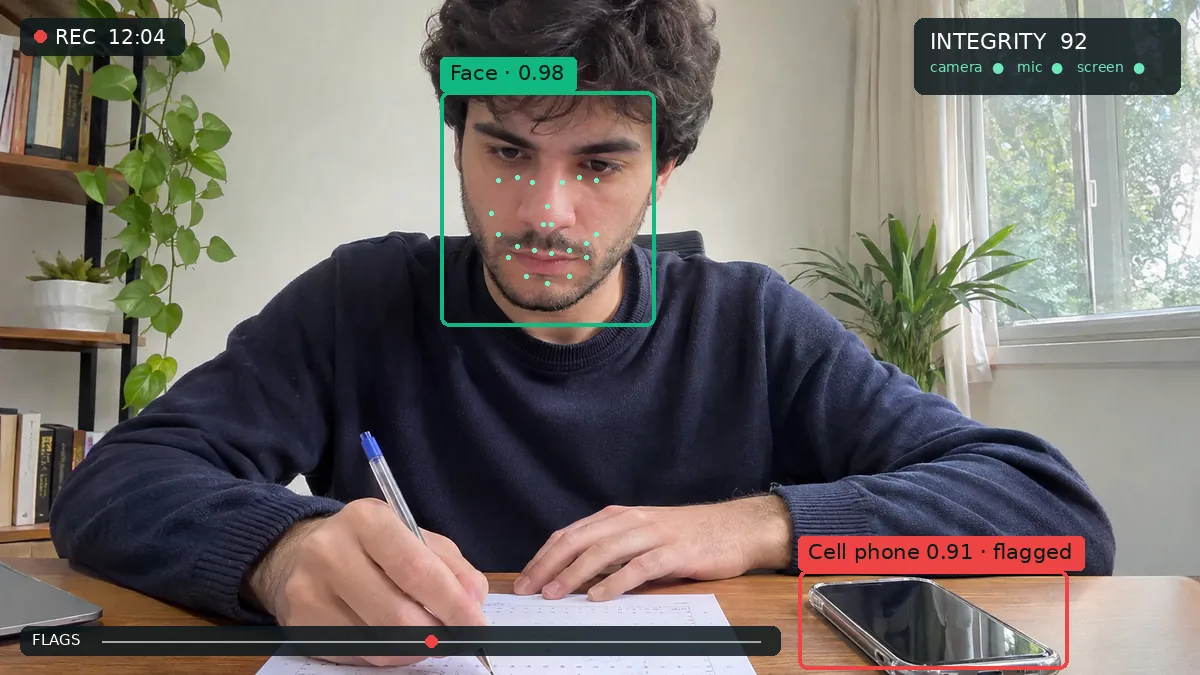
For a final exam or a certification, camera checks add a real deterrent against phones, notes and helpers. Choose a privacy-respecting option that analyzes video on the device, uploads only flagged moments and leaves the decision to a person. We explain how that works here: AI Proctoring Without Spyware: How On-Device Proctoring Works
6. Be clear about the rules
Many students are unsure what is allowed. Say it plainly in the instructions: whether AI tools are allowed for this test, which ones, and what happens if the rules are broken. When AI help is allowed, ask students to describe how they used it. Clear rules prevent more problems than any detector.
How FormRead Online helps
- Integrity levels from Light to Strict: fullscreen, tab switch and paste checks, and on-device camera checks when you need them.
- Paste-burst and typing-pattern flags on open answers.
- An AI oral follow-up question after essays, graded with your rubric.
- A collusion report of unusually similar answers.
- Audio and video answers, transcribed and graded by AI.
- Question pools, shuffling and time limits, so no two students see the same test.
- The option to print the same test on paper and grade it with a phone.
Giving an exam online soon? FormRead Online includes these integrity tools in every plan, with no per-exam fee.
Discover FormRead OnlineGrading open answers is the other half of the job. Here is how AI grading with a rubric works on paper and online: AI Grading for Open-Ended and Essay Questions on Paper Exams
Frequently Asked Questions
Can AI text detectors prove a student used ChatGPT?
No. AI text detectors give probabilities, not proof, and they produce false positives, especially on short texts and on writing by non-native speakers. OpenAI withdrew its own AI text classifier in 2023 because of its low accuracy. Use them, if at all, as one weak signal among many.
Does a webcam stop ChatGPT cheating?
Only partly. A camera can notice a phone or a second person, but it cannot see a chatbot open in another window. Fullscreen, tab and paste checks help more, and question design helps most.
What is an AI oral follow-up?
After a candidate submits a written answer, the AI asks one short spoken question about what they wrote, and grades the reply. Someone who wrote the answer can explain it in a few sentences. Someone who pasted it usually cannot.
Is a paper exam the safest option?
For high-stakes tests in a room you control, often yes. FormRead lets you print the same test as a bubble sheet and grade it from a phone photo, so you can switch formats without rewriting anything.