AI Proctoring Without Spyware: How On-Device Proctoring Works
Online exams need some integrity checks. They do not need a stranger watching a live video of a student's bedroom. Here is how a lighter approach works, what it costs, and where its limits are.
 Oscar Munoz
·
·
4 min read
Why proctoring got a bad name
When exams moved online, many schools adopted remote proctoring tools in a hurry. Students were asked to install browser extensions or lockdown software, keep a webcam on for the whole exam, and accept that the video could be stored and reviewed. The complaints followed quickly: it felt invasive, it flagged innocent behavior, and it was expensive.
Several problems were real. Older face detection models worked worse in poor lighting and on some skin tones. Natural behavior, like looking away to think or reading a question aloud, raised flags. Teachers received long lists of alerts with no time to review them. And because most tools were billed per exam, every proctored test had a direct cost.
A different design: analyze on the device, upload only evidence
The camera and microphone feed does not have to leave the candidate's computer. Small AI models can now run inside the browser, a few times per second, and look for the few things that matter during an exam. That changes the privacy and the cost of proctoring at the same time.
-
1
Detection on the device
A face model checks whether a face is present, whether there is more than one, and whether the candidate looks away for a long time. An object model looks for a phone, a book or another person. A voice model notices speech. Browser signals add tab switches, fullscreen exits, pasting and a second monitor.
-
2
Evidence, not a recording
Instead of streaming video, the browser uploads a small snapshot every 30 seconds and a short burst of frames around each flagged moment. A one-hour exam produces a few megabytes, and the evidence is deleted after 30 days.
-
3
AI review of the flags
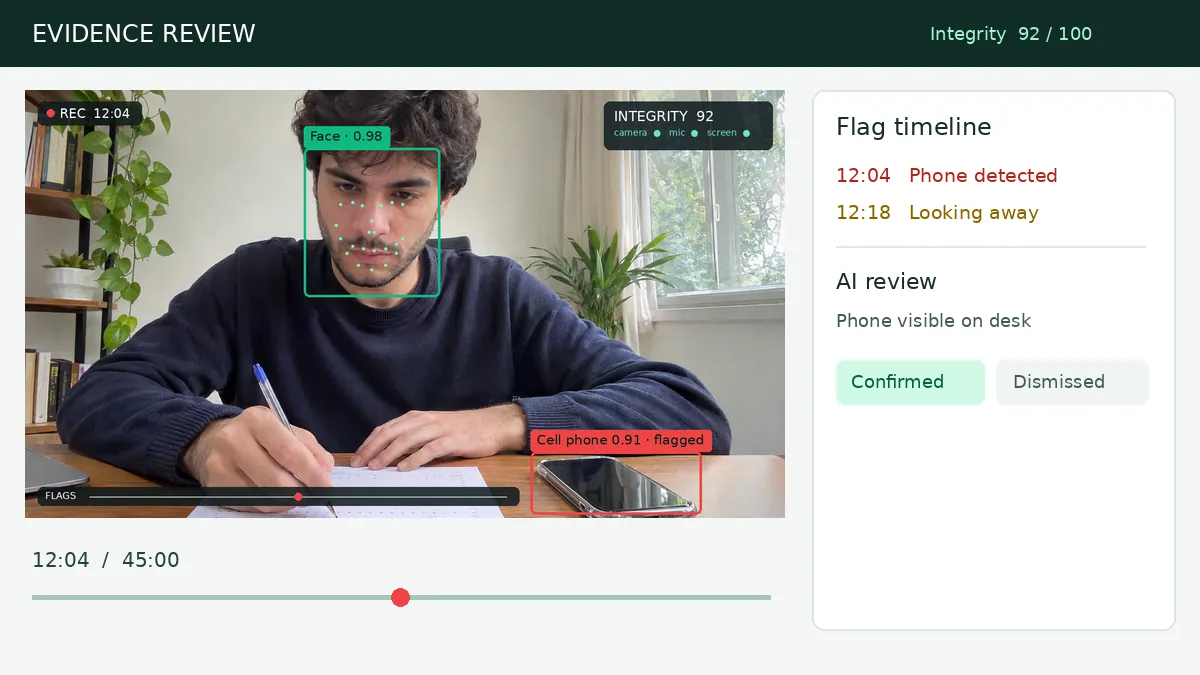
A vision model looks only at the flagged frames and answers a narrow question: is there a phone, a second person, notes or headphones? When it is unsure, it says so. This removes most false alarms, like a cat walking past, before a teacher sees anything.
-
4
A person decides
The teacher sees a timeline with thumbnails and an integrity score, confirms or dismisses each flag, and decides what happens next. Flags never change a grade automatically.
What it costs compared with legacy proctoring
Legacy automated proctoring is usually priced per exam or per student. On-device proctoring moves the heavy computing to hardware the candidate already has, so the remaining cost is storage of a few images and a short AI review of flagged moments.
| Approach | What is uploaded | Typical price |
|---|---|---|
| Live human proctoring | Continuous video to a remote proctor | Usually the most expensive option, quoted per exam |
| Automated cloud proctoring | Webcam and often screen recordings | About $3 to $9 per exam, as reported by universities |
| On-device AI proctoring (FormRead) | Periodic snapshots and flagged moments only | Included in every FormRead plan, no per-exam fee |
Questions to ask any proctoring vendor
- Is video analyzed on the device, or streamed and stored?
- What exactly is uploaded, and how long is it kept?
- Are biometric templates of faces stored?
- Does the system make decisions, or only raise flags for a person?
- Can individual students be exempted from the camera as an accommodation?
- Does it require an extension, an LMS or special software?
- How is it priced: per exam, per student, or included?
The honest limits
No proctoring system, on-device or not, catches everything. A helper sitting out of view or a hidden earpiece can still go unnoticed. Browser checks cannot see a second device on the desk unless the camera does. Flags can be wrong. The goal is a reasonable deterrent and useful evidence, not certainty.
That is why question design still matters most. AI chatbots changed what cheating looks like, and a camera cannot see a chatbot in another tab. We wrote a separate guide on that: How to Stop ChatGPT Cheating in Online Exams
How to set it up in FormRead
In FormRead Online, each test has one integrity level. Light uses no camera and checks fullscreen, tabs and pasting. Standard adds the on-device camera and microphone checks with AI review. Strict adds an ID check, a room scan, screen sharing, an optional phone as a second camera and Secure mode in the desktop app. Candidates see a consent screen first, and you can exempt anyone from the camera.
Want to see it in action? Read how FormRead AI proctoring works, level by level.
AI exam proctoringPrefer to avoid screens altogether for a high-stakes exam? Paper is still the most private format. FormRead grades printed bubble sheets from a phone photo: see how bubble sheet scanning works.
Frequently Asked Questions
Is on-device AI proctoring less accurate than cloud proctoring?
Not for the checks that matter most. Modern face and object detection models are small enough to run in a browser at a few frames per second, which is plenty for an exam. The flagged moments can then be reviewed by a larger AI model in the cloud, which removes most false alarms.
Does on-device proctoring record video?
It does not need to. The video is analyzed on the device and discarded. Only a small snapshot every 30 seconds and a few frames around each flag are uploaded as evidence.
Is browser-based proctoring legal under GDPR?
It can be, if it is proportionate and transparent: a clear purpose, a consent or notice screen, data minimization, a short retention period, and no automated decisions about the candidate. Each institution remains responsible for its own legal basis.
How much does AI proctoring cost?
Legacy automated proctoring is often billed per exam, and universities report prices of about $3 to $9 per exam. On-device proctoring costs a few cents of computing per attempt, which is why FormRead includes it in every plan.